


1
Set up your project
Register your account, create your project, add the key details and invite your team. Assign roles so managers, engineers and subcontractors each see the right information.
Manage tasks, RFIs, site diaries, team conversations, photos, attendance, and reports—so everyone stays informed and nothing gets missed.
Free during the betaNo credit card
Built for the teams that build
Manage multiple sites from a single dashboard. Track schedules, assign tasks, monitor progress, and keep documents organized — all in one place built specifically for construction teams.
Visualize every phase of a build. Set dependencies, track completion, and auto-flag delays before they cascade into bigger problems.
Switch between active projects instantly. See live health scores, overdue items, and team workloads across every site you're running.
Store plans, reports, inspection certificates, and site photos in one searchable location linked directly to tasks and diary entries.
Control what each team member sees. Site managers, subcontractors, and clients each get a tailored view with the right level of access.
Log everything that happens on-site — weather, workforce, deliveries, incidents, and progress notes — with structured templates that auto-attach to the right project and date.
Choose from prebuilt scan-paper or digital templates. Fill in workforce counts, weather conditions, equipment on-site, and daily progress notes in minutes.
Auto-generated PDF reports from each diary entry. Shareable with clients and project owners at the click of a button — professional and audit-ready.
Every diary entry is timestamped and location-tagged. Know exactly who logged what, when, and from which site — no more backdating or guesswork.
Attach photos directly to diary entries and tag them with your own labels — by trade, issue or area — so each one stays with the relevant task or report.
No more hunting through WhatsApp groups or email chains. SiteNext threads every conversation directly to the task it belongs to — so context never gets lost between field and office.
Every conversation lives inside a task. See who said what, when it was resolved, and what action was taken — without leaving the project view.
Each task thread shows the task's status and priority, so blocked work stands out. Narrow the list to unread, project or direct conversations to focus on what needs attention now.
Mention teammates, subcontractors, or clients directly in threads and they are notified at once. The task's owner and assignees sit right beside the conversation.
Get instant alerts when tasks are updated, blocked, or completed. Stay in the loop from site or office without checking in manually.
Discover how businesses use SiteNext to simplify project planning, team collaboration, client communication, and day-to-day operations.
A secure and reliable time-tracking solution that combines photo verification, GPS location tracking, and real-time workforce visibility to help businesses manage attendance with confidence.
Employees take a photo when clocking in and clocking out, providing visual proof of attendance and helping prevent buddy punching or fraudulent time entries.
Every punch is automatically tagged with the employee's GPS location, ensuring staff are at the correct job site or workplace when recording their time.
Clock-in and clock-out events are recorded with precise timestamps, creating accurate and reliable attendance records.
Administrators can view employee locations on an interactive map, making it easy to monitor on-site teams and field workers in real time.
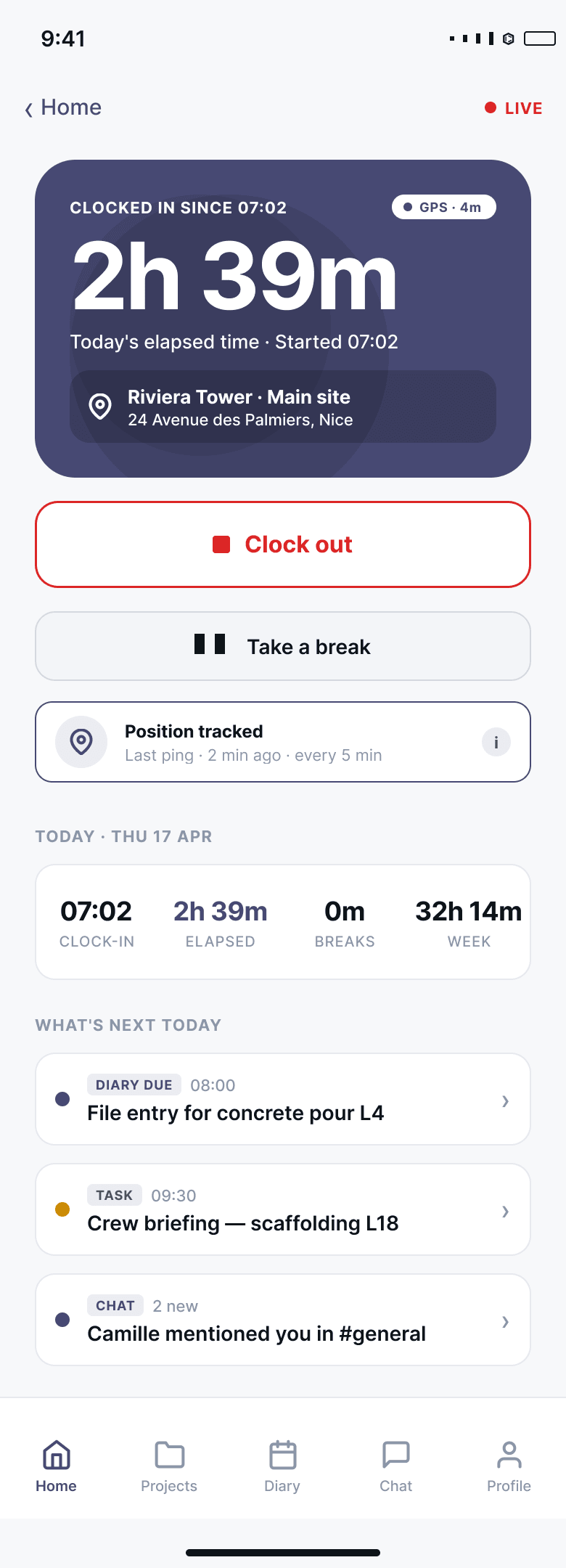
SiteNext Mobile keeps your field teams connected and productive by providing instant access to projects, tasks, site diaries, reports, photos, and team communications from anywhere. Employees can clock in and out, update task progress, create and send reports, capture site photos, and collaborate through task-based chat threads — all from their mobile device, ensuring real-time visibility and seamless project management on the go.
View assigned tasks, update progress, add notes, and mark tasks complete from anywhere.
Create and submit daily site diaries to record activities, progress updates, delays, and important project information.
Collaborate within dedicated task-based chat threads, keeping all discussions connected to the relevant work item.
Take photos directly from the mobile app to document progress, quality checks, safety observations, and site issues.
Sync field information instantly with the office, ensuring everyone has access to the latest project data.
Scroll the screen to explore
Manage attendance, tasks, communications, reports, diaries, and project documentation from a single mobile platform.
Every photo is stored under its project and site with the date, the time and who took it, and can be tagged so it is found again — a reliable record of when work was performed.
Employees can record attendance directly from their mobile device with GPS location, timestamps, and optional photo verification.
Generate professional reports directly from the field and send them instantly to managers, clients, or project stakeholders.
Generate comprehensive workforce, attendance, and site management reports in seconds. Access real-time data on employee hours, GPS-tracked activities, photo-verified attendance records, and site performance. Easily filter, export, and share reports to support payroll processing, compliance requirements, and informed business decisions.
Download reports in multiple formats for payroll processing, client updates, compliance requirements, and management reviews.
Generate reports for specific days, weeks, months, projects, or custom time periods to meet your operational needs.
Create daily site, weekly progress, site diary register, task, RFI, attendance, timesheet and photo reports to track completed work, workforce, site conditions, project progress, outstanding items, overdue actions, working hours, visual records and key site events.
Keep all attendance, workforce, and site management data organized in one place for quick and easy access.
From setting up your first project to sharing professional reports — three steps to run every site from one platform.
Register your account, create your project, add the key details and invite your team. Assign roles so managers, engineers and subcontractors each see the right information.
Pick a template, plan the work and create tasks with owners and due dates. Track progress and record daily site diaries with photos, labour, materials and delays.
Turn site diary, task and planning data into professional reports. Share daily or weekly updates with your team, project manager or client in a click.
Set up your project, manage the work on site and share professional reports — all from one simple construction management system.
Start your projectEvery feature included, unlimited projects and unlimited team members — you only pay for the admins who run them. Free 1-month trial, no credit card required.
Everything SiteNext does, for your whole team.
or €950 per admin, billed yearly — save 20%
Unlimited team members — you only pay per admin
Engineers, supervisors, site crews and clients all join for free. No seat fees, no per-user surprises.
For larger organisations with bigger portfolios.
Tailored to your organisation
Project management
Site diary
Chat & task threads
Attendance & timekeeping
1-month free trial · No credit card required · Cancel anytime · VAT not applicable (art. 293 B CGI)
We're opening early access to a limited number of construction teams. Leave your details and we'll reach out the moment it's ready.
We're in active development and opening early access in 2026. Join the waitlist and you'll be among the first teams invited in.
Yes — early-access teams get in at no cost while we build alongside them. We'll share pricing well before anything changes.
Construction teams running real sites — general contractors, civil and infrastructure, fit-out and trades, and the subcontractors who work with them.
Yes. SiteNext works on tablets, iPads, laptops, web browsers, and all types of smartphones, including iOS and Android devices. It is built to be fast and easy to use in the field, so you can log the diary, clock in, and check resources from anywhere — not just from a desk.
Your name, company and email are only used to contact you about early access — no spam, no sharing. You can ask us to remove them at any time.